Deprecated: strpos(): Passing null to parameter #1 ($haystack) of type string is deprecated in /home/dailynet/public_html/wp-content/plugins/elementor-pro/modules/loop-builder/module.php on line 200

Deprecated: Return type of Requests_Cookie_Jar::offsetExists($key) should either be compatible with ArrayAccess::offsetExists(mixed $offset): bool, or the #[\ReturnTypeWillChange] attribute should be used to temporarily suppress the notice in /home/dailynet/public_html/wp-includes/Requests/Cookie/Jar.php on line 63

Deprecated: Return type of Requests_Cookie_Jar::offsetGet($key) should either be compatible with ArrayAccess::offsetGet(mixed $offset): mixed, or the #[\ReturnTypeWillChange] attribute should be used to temporarily suppress the notice in /home/dailynet/public_html/wp-includes/Requests/Cookie/Jar.php on line 73

Deprecated: Return type of Requests_Cookie_Jar::offsetSet($key, $value) should either be compatible with ArrayAccess::offsetSet(mixed $offset, mixed $value): void, or the #[\ReturnTypeWillChange] attribute should be used to temporarily suppress the notice in /home/dailynet/public_html/wp-includes/Requests/Cookie/Jar.php on line 89

Deprecated: Return type of Requests_Cookie_Jar::offsetUnset($key) should either be compatible with ArrayAccess::offsetUnset(mixed $offset): void, or the #[\ReturnTypeWillChange] attribute should be used to temporarily suppress the notice in /home/dailynet/public_html/wp-includes/Requests/Cookie/Jar.php on line 102

Deprecated: Return type of Requests_Cookie_Jar::getIterator() should either be compatible with IteratorAggregate::getIterator(): Traversable, or the #[\ReturnTypeWillChange] attribute should be used to temporarily suppress the notice in /home/dailynet/public_html/wp-includes/Requests/Cookie/Jar.php on line 111

Deprecated: Return type of Requests_Utility_CaseInsensitiveDictionary::offsetExists($key) should either be compatible with ArrayAccess::offsetExists(mixed $offset): bool, or the #[\ReturnTypeWillChange] attribute should be used to temporarily suppress the notice in /home/dailynet/public_html/wp-includes/Requests/Utility/CaseInsensitiveDictionary.php on line 40

Deprecated: Return type of Requests_Utility_CaseInsensitiveDictionary::offsetGet($key) should either be compatible with ArrayAccess::offsetGet(mixed $offset): mixed, or the #[\ReturnTypeWillChange] attribute should be used to temporarily suppress the notice in /home/dailynet/public_html/wp-includes/Requests/Utility/CaseInsensitiveDictionary.php on line 51

Deprecated: Return type of Requests_Utility_CaseInsensitiveDictionary::offsetSet($key, $value) should either be compatible with ArrayAccess::offsetSet(mixed $offset, mixed $value): void, or the #[\ReturnTypeWillChange] attribute should be used to temporarily suppress the notice in /home/dailynet/public_html/wp-includes/Requests/Utility/CaseInsensitiveDictionary.php on line 68

Deprecated: Return type of Requests_Utility_CaseInsensitiveDictionary::offsetUnset($key) should either be compatible with ArrayAccess::offsetUnset(mixed $offset): void, or the #[\ReturnTypeWillChange] attribute should be used to temporarily suppress the notice in /home/dailynet/public_html/wp-includes/Requests/Utility/CaseInsensitiveDictionary.php on line 82

Deprecated: Return type of Requests_Utility_CaseInsensitiveDictionary::getIterator() should either be compatible with IteratorAggregate::getIterator(): Traversable, or the #[\ReturnTypeWillChange] attribute should be used to temporarily suppress the notice in /home/dailynet/public_html/wp-includes/Requests/Utility/CaseInsensitiveDictionary.php on line 91
Google Now notifications available with Chrome Beta - The Daily Net

Google Now notifications available with Chrome Beta

google-now-chrome-640x481

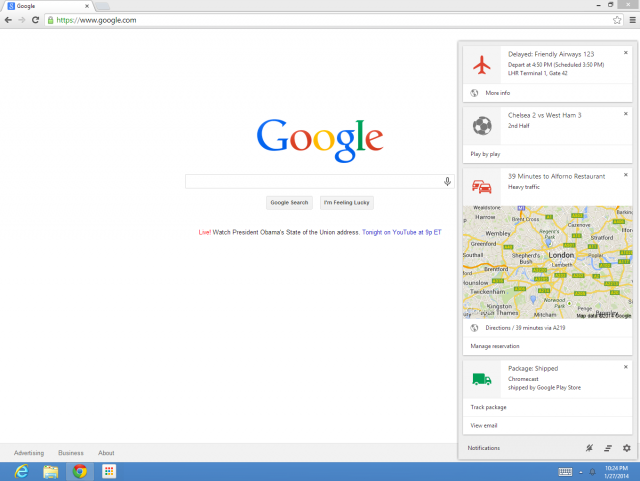
Android users will know how convenient Google Now can be. The service’s cards will feed you great information based on your location, search results and other data your smartphone takes. We have seen Google Now notifications in Chrome OS Dev and Chrome Canary, and now Chrome Beta users can enjoy them too!

For now, Google still separates the “OK Google” hotword voice commands from the Google Now results. These functions operate separately, so how does Google Now in Chrome Beta know what to display? It’s actually quite simple, it just takes the information from your Android or iOS Google Now.

You simply have to be signed on to the same Google account as your other devices. Best thing about it is you really have to do nothing to start taking advantage of these cards. You just update your Chrome Beta browser, make sure you are signed into the right Google account and you are set.

For more details, you can always check Google’s website on Chrome Google Now Cards. Or you can check out the infographic we posted a while ago, showing you how to use Google Now.

[Phandroid]